LOGGING IN
To have access to all the agent pages on the website, you have to be logged in. Some agents do not log in regularly and/or forget their login details and then contact us in a hurry to reset their password so they can place an order before the cut-off time. We use the easiest login process with your name and surname as username and a really easy password. Your login details were sent to you by your Mentor Agent on WhatsApp as soon as you were added to the group. You should be logged in at the moment to be able to read this post, but in the future if you are struggling to log in, please remember to use the Troubleshooter on the login page. It’s even easier after the once-off linking of your login details with your Facebook account. Then you do not even have to remember your username or password Instructions to link Facebook are added to the Login page.
AGENT LIST CLEAN-UP
Please inform us if you do not want to be an agent anymore by following this link. You are welcome to apply in the future if you want to be an agent again.
BEFORE & AFTERS AND TESTIMONIALS
Please send all pictures on the website, not on WhatsApp. It is also mentioned in the Agent Training. Go to the Testimonials page (Website menu or main menu) and send your pics with all the detail we need to watermark and save the before and after pictures. Clients can also submit their own pictures.
If it is sent on WhatsApp, we do not have all the necessary info and the pictures are blurred out when we transfer them to a computer. They may also get lost in all of the phone messages…

TEMPLATES FOR ADS / FLYERS
Save your details on our templates and use them to advertise. Just add your name, surname, phone number and e-mail address on a template, save it and post it on Facebook.
See all of our templates for ads, flyers and banking details on the Downloads & Templates page and step-by-step instructions with screenshots on how to edit them. There are currently 22 templates and we’ve also added profile pictures and products pics you can use. Add a before & after picture to your post and attract the attention of possible clients. To advertise regularly and consistently is the only way to be visible and get new clients. If people do not see ads from you, they will order from someone else who advertises.

BUSINESS HOURS AND AGENT QUESTIONS
Please note that we will follow these business hours for Agent and Mentor questions/queries:
Orders: 8h00 – 10h00
Dominic and Suzanne WhatsApp messages: 10hoo – 12h00
At these times during the week we are available to assist agents and we will only reply to messages during this time frame. Please do not send a message in the middle of the night or on weekends or send lots of ?????? if we do not reply. We are following a new schedule to try and get everything done and avoid unnecessary interruptions. Your assistance will be greatly appreciated.
Outside of these hours, please respect our time and use the website for any questions you may have or contact your Mentor Agent. Everything you need is on the website. Just visit the Website Menu page or the Agent Questions page (both links can be found at the bottom of any page on the website). We’ve heard all possible agent questions before and added an answer or solution to the website. If all else fails, please contact us using this form.
Note to Mentor Agents: Please try to assist your subs before contacting us (also within the hours above, please). That is the reason why you are a Mentor and have sub agents. Use the Website Menu (link above) to find an answer/solution to their question and if a sub struggles to log in, try to log in with their details to check if they perhaps made a typo, before contacting us.
You will see this on all pages of the LLL site as a quick popup of the most used links on the website:
(click on the link below to try it out)
Always go to the Website Menu page to see ALL OPTIONS available:

Please enable the website notifications on your phone/computer/tablet to receive a message as soon as we post new messages or tracking numbers on the website.
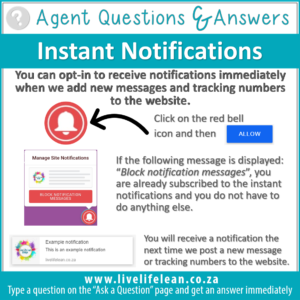
If you do not see the notification on your screen, you can add this manually. Go to the 3 dots at the top of your phone screen, click on Settings, Site settings, Allow notifications. You will receive a notification the next time we post a message or tracking numbers on the website.
If you are not added to the Agent Info Group on Facebook yet, please send a friend request to Dominic AND Suzanne
Like & Share our pages on Facebook.
Click here to find the links to all of our product pages on Facebook